> ## Documentation Index
> Fetch the complete documentation index at: https://support.lumafield.com/llms.txt
> Use this file to discover all available pages before exploring further.
# Neptune Lock Out Tag Out Procedure
> Guidelines for system isolation and maintenance
Purpose of Lockout/Tagout (LOTO)
Proper LOTO practices and procedures safeguard workers from the release of hazardous energy among other safety concerns. Applying LOTO helps prevent injuries from equipment that is in an unsafe or potentially unsafe condition.
***This guide is intended to supplement your facility's established safety program(s). Always adhere to your site's specific Lockout/Tagout (LOTO) protocols. The application and removal of LOTO devices must strictly be performed by authorized employees.***
When to apply LOTO
Always apply LOTO to a scanner if it poses a safety hazard, requires maintenance, or is pending required compliance testing.
**Physical safety hazards and servicing**
Lock out the scanner immediately if it:
* **Needs repair:** Known or suspected to have a functional, structural, or electrical issue
* **Is incomplete:** Disassembled, undergoing maintenance, or missing components
* **Appears unsafe:** Exposed hazards such as internal wiring, moving parts, or radiation
**Radiation emission surveys**
Lock out the scanner if a radiation emissions survey is required. The system must remain locked out until the survey is successfully performed and passed.
**Note:** Radiation emission surveys are required as part of Lumafield’s annual service. Off-cycle surveys may be required if the scanner is relocated.
LOTO steps
Follow these steps to safely lock out a Lumafield scanner and report the condition:
1. **Shut down the scanner:** Engage the Emergency Stop (E-stop) button, remove the key, and turn off the main power switch
2. **Isolate energy sources:** Unplug the main power cord from the wall. If your installation includes an on-premise system or auxiliary server, disconnect its power source as well
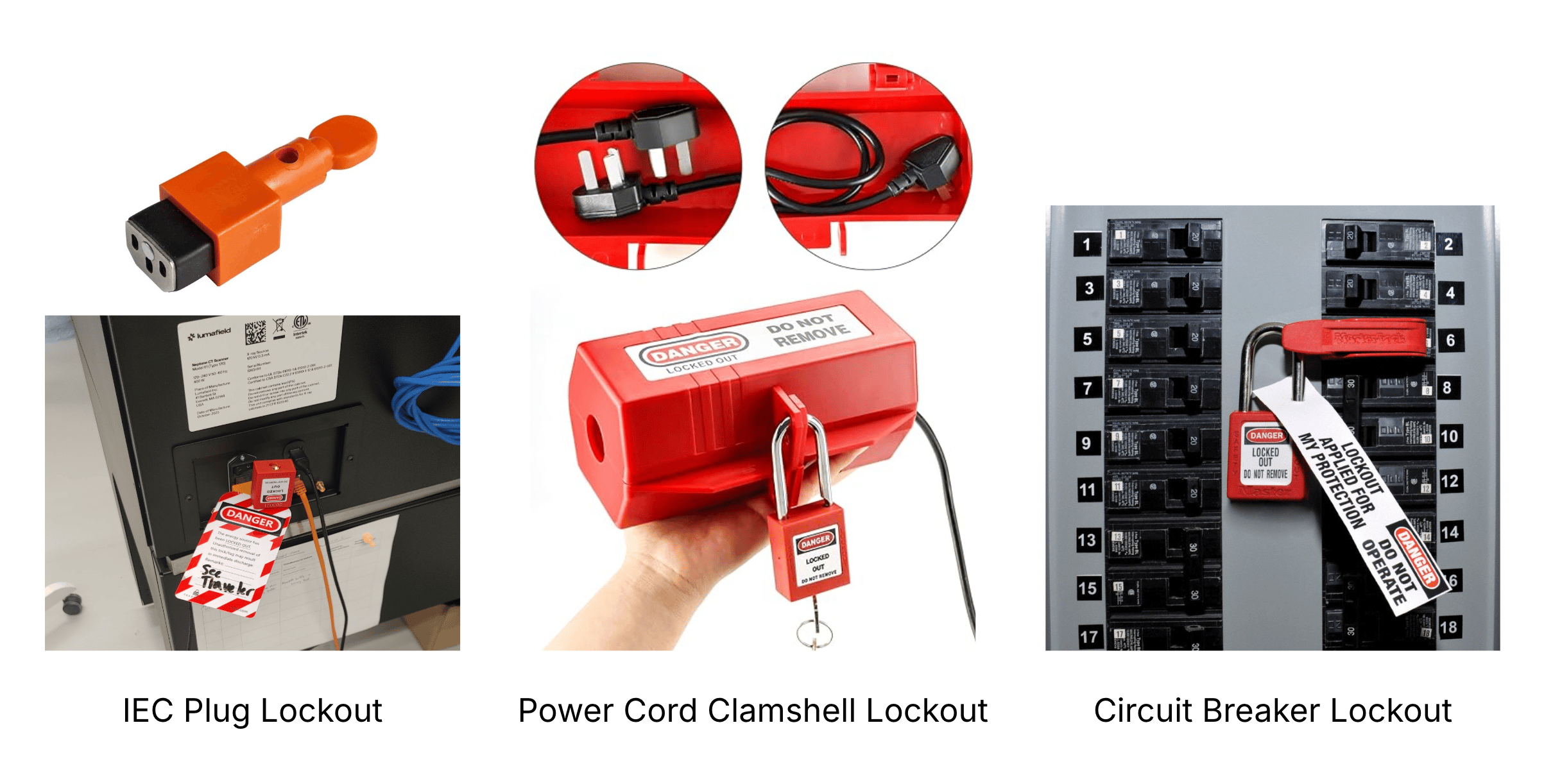
3. **Apply LOTO devices:** Secure the plug using an appropriate lockout device (such as an IEC plug lockout) along with your lock and tag
4. **Document the tag:** Clearly write your name, date, and the specific reason for the lockout on the tag
5. **Verify zero-energy state:** Confirm the system is fully de-energized by attempting to flip the power switch on the back of the scanner. Ensure the touchscreen and internal lights remain off
**Note:** Be sure to switch it back to the OFF position after verifying
6. **Notify affected team members:** Inform all personnel with scanner access that the system is locked out and will remain out of service until the LOTO device is formally removed
7. **Contact Lumafield Support:** Email [**support@lumafield.com**](mailto:support@lumafield.com) with the machine's 6-digit serial number (located on the rear panel near the power switch) and the reason for the lockout
### Equipment restoration and tracking
Documenting the exact conditions required to safely return a scanner to service is critical. We recommend maintaining a LOTO Restoration Log that tracks:
* **Lockout details:** The date and name of the person applying the lock
* **Reason for lockout:** The specific issue or trigger (e.g., *"Faulty X-ray source"* or *"Scanner relocated; awaiting radiation emissions survey"*)
* **Conditions for restoration:** Clear criteria that must be met before removing LOTO (e.g., *"Install and verify new X-ray source"* or *"Complete full radiation emissions survey with Lumafield"*)
* **Verification and sign-off:** Signatures and dates for both the person who restored the equipment and the authorized reviewer who verified it is safe for operation
### **Common Lumafield LOTO devices**
Depending on your scanner model and facility infrastructure, use the appropriate lockout device for your power setup. Examples of commonly used devices include:
* **IEC plug lockout (standard):** The primary lockout method for Neptune scanners, designed to securely cover and block access to the IEC power inlet on the back of the machine
* **Power cord clamshell lockout:** Encloses standard wall power plug connectors to physically prevent the cord from being plugged back into an outlet
* **Circuit breaker lockout:** Secures the dedicated breaker at your facility's electrical distribution panel (used for hardwired or dedicated line installations)