> ## Documentation Index
> Fetch the complete documentation index at: https://support.lumafield.com/llms.txt
> Use this file to discover all available pages before exploring further.
# Neptune 简介
> Lumafield 的旗舰 Scanner
Neptune 是 Lumafield 专为单个零件检测设计的旗舰 X 射线 CT 扫描仪。该系统将扫描仪上的引导式扫描设置与基于云的处理和 Voyager 分析协作工具相结合,旨在使 CT 工作流程融入日常工程和质量流程,变得触手可及、切实可行。
## Neptune 硬件
凭借紧凑的 6 英尺占地面积和标准 120V 电源要求,Neptune 专为无缝融入任何办公室或车间环境而设计。直观的触控屏界面和自动化设置流程使您现有团队无需专职 CT 技术员即可采集高分辨率数据。
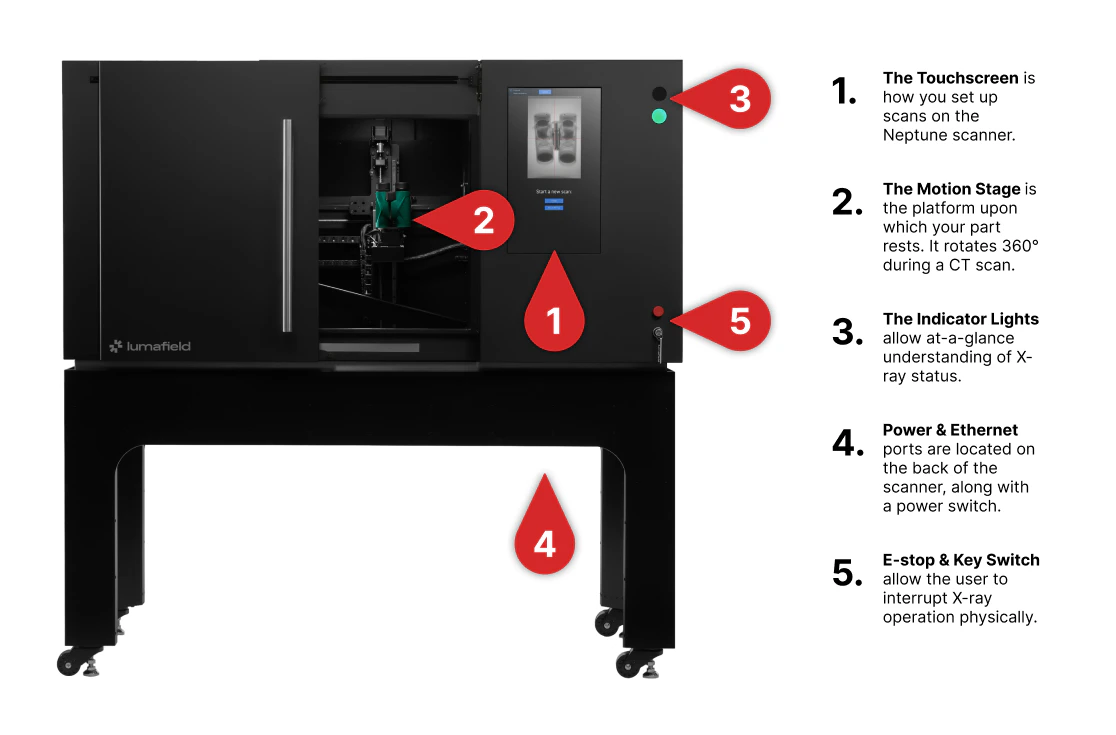 有关详细的技术规格和全面的操作指南,请参阅 [Neptune 用户手册](/zh-Hans/neptune/neptune-user-manual)。
## 触控屏界面
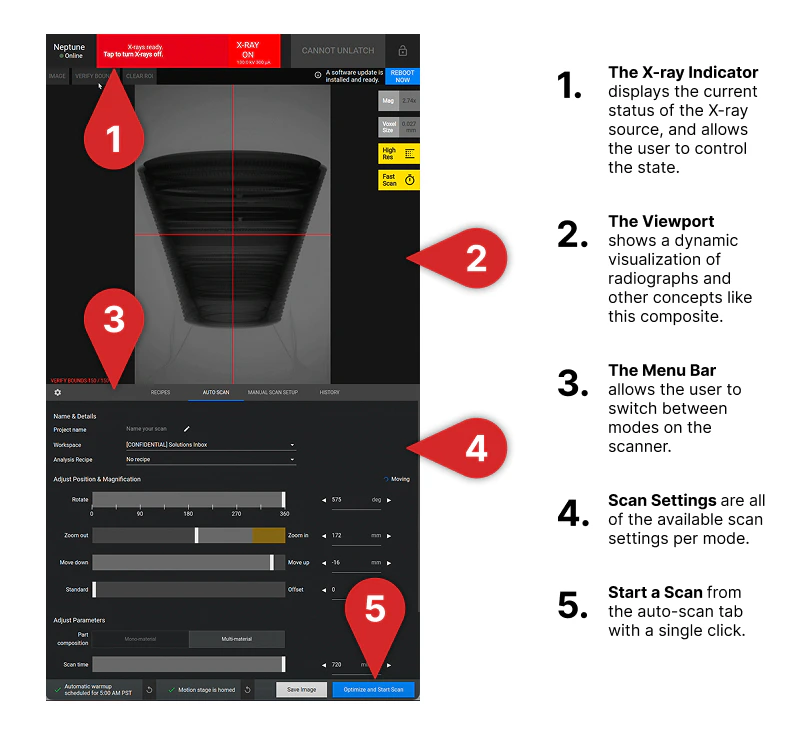
Neptune 触控屏提供专为快速检测和深度应用开发双重需求设计的流畅界面。根据您的工作流程,可选择以下模式:
* **自动扫描 Setup:** 推荐所有用户使用的扫描方式。该模式自动优化设置,为您的对象选择最佳参数,以最少的配置确保高质量结果。
* **手动扫描 Setup:** 专为 CT 专家和应用开发而设计。
**注意:** 首次使用手动扫描前,请通过 [support@lumafield.com](mailto:support@lumafield.com) 联系 Lumafield 支持团队。
* **Recipes:** 使用 Recipes 保存并重新加载成功的扫描配置,让任何操作人员无需手动设置即可在相同零件上获得一致的结果。
* **Scan History:** 全面记录历史操作的日志。可监控当前上传状态、查看过往扫描参数,或使用与之前相同的设置重新运行扫描(Repeat Scan)。
有关详细的技术规格和全面的操作指南,请参阅 [Neptune 用户手册](/zh-Hans/neptune/neptune-user-manual)。
## 触控屏界面
Neptune 触控屏提供专为快速检测和深度应用开发双重需求设计的流畅界面。根据您的工作流程,可选择以下模式:
* **自动扫描 Setup:** 推荐所有用户使用的扫描方式。该模式自动优化设置,为您的对象选择最佳参数,以最少的配置确保高质量结果。
* **手动扫描 Setup:** 专为 CT 专家和应用开发而设计。
**注意:** 首次使用手动扫描前,请通过 [support@lumafield.com](mailto:support@lumafield.com) 联系 Lumafield 支持团队。
* **Recipes:** 使用 Recipes 保存并重新加载成功的扫描配置,让任何操作人员无需手动设置即可在相同零件上获得一致的结果。
* **Scan History:** 全面记录历史操作的日志。可监控当前上传状态、查看过往扫描参数,或使用与之前相同的设置重新运行扫描(Repeat Scan)。
 如果您是首次操作 Neptune,请访问[运行您的第一次扫描](/zh-Hans/platform/running-first-scan)页面。