> ## Documentation Index
> Fetch the complete documentation index at: https://support.lumafield.com/llms.txt
> Use this file to discover all available pages before exploring further.
# Neptune 簡介
> Lumafield 的旗艦掃描儀
Neptune 是 Lumafield 專為單個零件檢測設計的旗艦 X 光 CT 掃描儀。該系統將掃描儀上的引導式掃描設定與基於雲端的處理和 Voyager 分析協作工具相結合,旨在使 CT 工作流程融入日常工程和品質管理流程,變得觸手可及、切實可用。
## Neptune 硬體
憑藉緊湊的 6 英尺佔地面積和標準 120V 電源需求,Neptune 專為無縫融入任何辦公室或車間環境而設計。直觀的觸控螢幕介面和自動化設定流程使您現有團隊無需專職 CT 技術員即可採集高解析度資料。
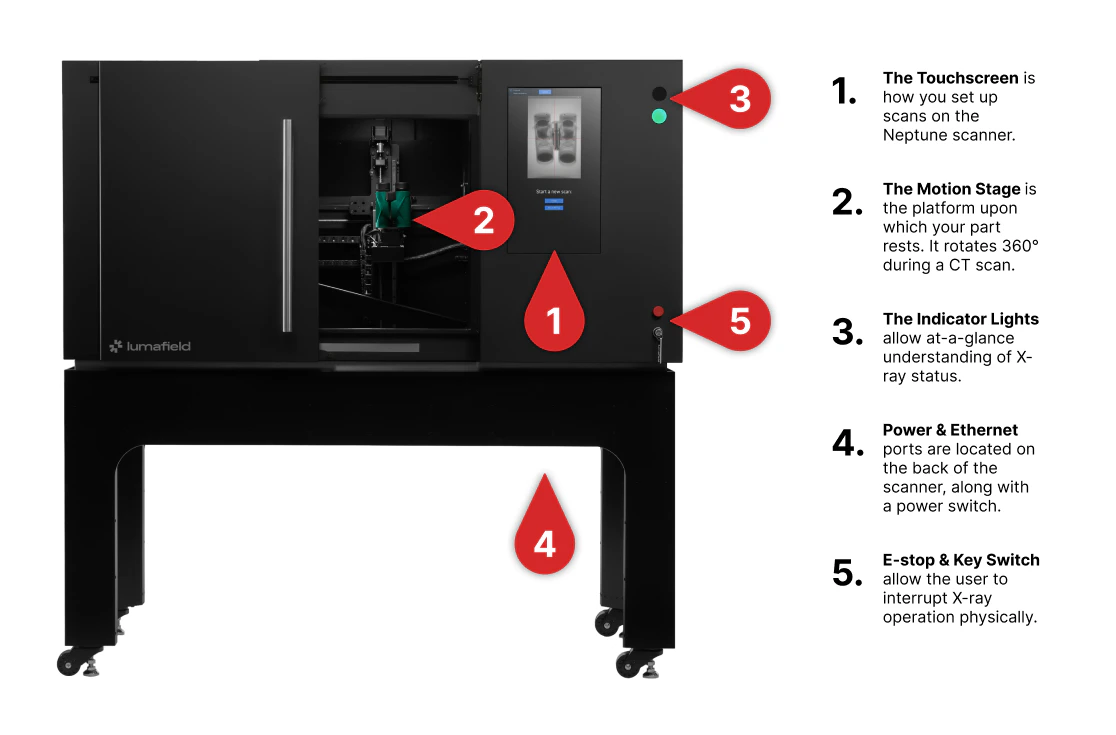 有關詳細的技術規格和全面的操作指南,請參閱 [Neptune 使用者手冊](/zh-Hant/neptune/neptune-user-manual)。
## 觸控螢幕介面
Neptune 觸控螢幕提供專為快速檢測和深度應用開發雙重需求設計的精簡介面。根據您的工作流程,可選擇以下模式:
* **自動掃描設定:** 推薦所有使用者使用的掃描方式。此模式自動優化設定,為您的物件選擇最佳參數,以最少的配置確保高品質結果。
* **手動掃描設定:** 專為 CT 專家和應用開發而設計。
**注意:** 首次使用手動掃描前,請透過 [support@lumafield.com](mailto:support@lumafield.com) 聯絡 Lumafield 支援團隊。
* **Recipes:** 使用 Recipes 儲存並重新載入成功的掃描配置,讓任何操作人員無需手動設定即可在相同零件上獲得一致的結果。
* **Scan History:** 全面記錄歷史操作的日誌。可監控目前上傳狀態、查看過往掃描參數,或使用與之前相同的設定重新執行掃描(Repeat Scan)。
有關詳細的技術規格和全面的操作指南,請參閱 [Neptune 使用者手冊](/zh-Hant/neptune/neptune-user-manual)。
## 觸控螢幕介面
Neptune 觸控螢幕提供專為快速檢測和深度應用開發雙重需求設計的精簡介面。根據您的工作流程,可選擇以下模式:
* **自動掃描設定:** 推薦所有使用者使用的掃描方式。此模式自動優化設定,為您的物件選擇最佳參數,以最少的配置確保高品質結果。
* **手動掃描設定:** 專為 CT 專家和應用開發而設計。
**注意:** 首次使用手動掃描前,請透過 [support@lumafield.com](mailto:support@lumafield.com) 聯絡 Lumafield 支援團隊。
* **Recipes:** 使用 Recipes 儲存並重新載入成功的掃描配置,讓任何操作人員無需手動設定即可在相同零件上獲得一致的結果。
* **Scan History:** 全面記錄歷史操作的日誌。可監控目前上傳狀態、查看過往掃描參數,或使用與之前相同的設定重新執行掃描(Repeat Scan)。
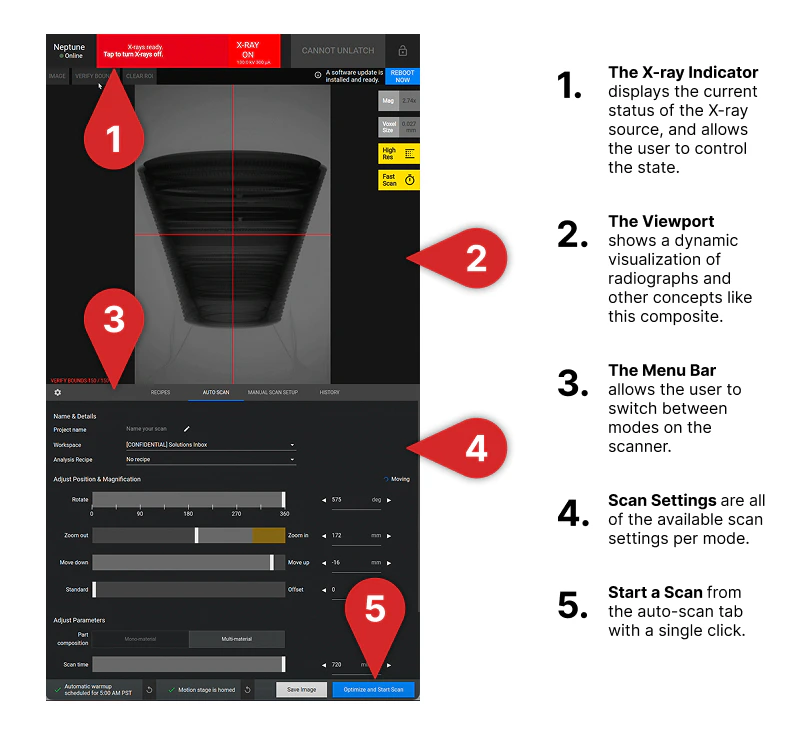 如果您是首次操作 Neptune,請訪問[執行您的第一次掃描](/zh-Hant/platform/running-first-scan)頁面。