> ## Documentation Index
> Fetch the complete documentation index at: https://support.lumafield.com/llms.txt
> Use this file to discover all available pages before exploring further.
# 分析模組
> 擴展您的分析能力
除了 Voyager 的核心功能之外,Lumafield 還提供專門的分析模組,旨在解決複雜的工程挑戰並簡化您的資料工作流程。
**Pro 與 Enterprise 方案現已包含所有模組。** 採用 **Pro** 與 **Enterprise** 方案的組織會在訂閱中獲得下列每一項分析模組。 Legacy 方案的客戶可以單獨購買模組——請聯絡您的客戶成功經理或 [sales@lumafield.com](mailto:sales@lumafield.com) 以了解詳情。
## Integrity Analysis
Integrity Analysis 模組是 Lumafield 用於識別和量化內部缺陷和特徵的綜合解決方案。該模組利用先進的演算法來非破壞性地檢查複雜的內部幾何形狀。
了解有關 Integrity Analysis 中包含的每個工具的更多資訊:
* [孔隙率分析](/zh-Hant/voyager/voyager-porosity-analysis)
* [裂紋檢測](/zh-Hant/voyager/voyager-crack-detection)
* [壁厚分析](/zh-Hant/voyager/voyager-wall-thickness-analysis)
* [夾雜物分析](/zh-Hant/voyager/voyager-inclusion-analysis)
 ## Exporting & Reporting
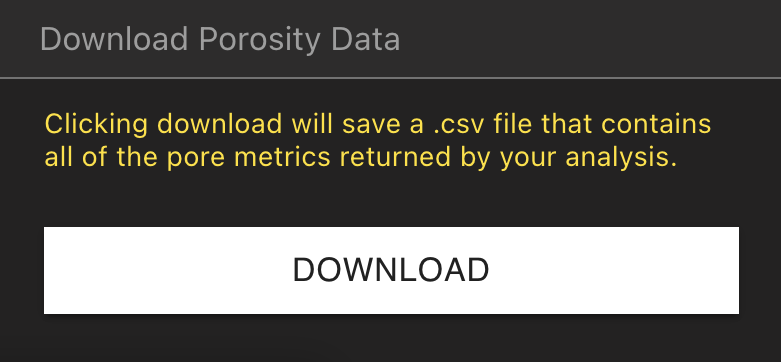
Exporting & Reporting 模組可讓使用者匯出 Integrity Analysis 工具產生的下採樣體積和結果,以進行下游報告和分析。
支援的導出包括:
* 孔隙率分析結果 (CSV)
* 裂紋檢測結果 (CSV)
* 壁厚分析結果(CSV、PLY)
* 包含物分析結果 (CSV)
* 100 MB 資料視圖解析度量
## Exporting & Reporting
Exporting & Reporting 模組可讓使用者匯出 Integrity Analysis 工具產生的下採樣體積和結果,以進行下游報告和分析。
支援的導出包括:
* 孔隙率分析結果 (CSV)
* 裂紋檢測結果 (CSV)
* 壁厚分析結果(CSV、PLY)
* 包含物分析結果 (CSV)
* 100 MB 資料視圖解析度量
 ## Full-Resolution Exports
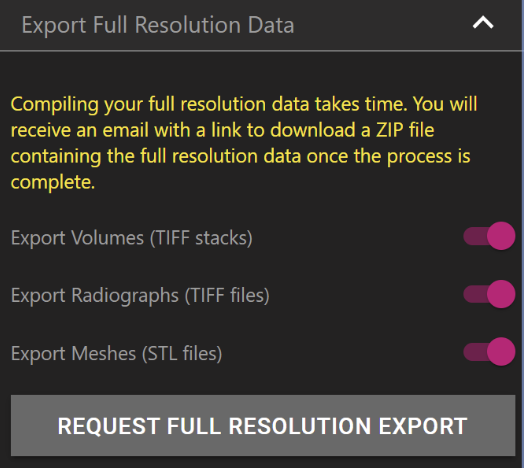
Full-Resolution Exports 模組使用戶能夠下載完整的專案資料。使用者可以直接從 Voyager 內的屬性面板請求匯出。然後,全解析度資料匯出將透過電子郵件以 ZIP 檔案形式發送。
支援的匯出視圖和格式包括:
* 卷(TIFF 堆疊)
* 射線照片(TIFF 檔案)
* 網格(STL 檔)
## Full-Resolution Exports
Full-Resolution Exports 模組使用戶能夠下載完整的專案資料。使用者可以直接從 Voyager 內的屬性面板請求匯出。然後,全解析度資料匯出將透過電子郵件以 ZIP 檔案形式發送。
支援的匯出視圖和格式包括:
* 卷(TIFF 堆疊)
* 射線照片(TIFF 檔案)
* 網格(STL 檔)
 ## Uplink
Uplink 可讓您在基於雲端的 Voyager 平台內上傳、儲存和分析來自任何工業 CT 掃描儀的體積資料。透過支援通用格式,Uplink 讓您的整個團隊都可以存取掃描,以實現無縫遠端協作。
目前支援的上傳格式:
* 體積圖形檔(.VGL + .RAW 或 .VOL)
* 體積圖形檔(.VGL + DICOM 堆疊)
* TIFF 堆疊
欲了解更多信息,請參閱完整文章[Uplink](/zh-Hant/uplink)。
## Uplink
Uplink 可讓您在基於雲端的 Voyager 平台內上傳、儲存和分析來自任何工業 CT 掃描儀的體積資料。透過支援通用格式,Uplink 讓您的整個團隊都可以存取掃描,以實現無縫遠端協作。
目前支援的上傳格式:
* 體積圖形檔(.VGL + .RAW 或 .VOL)
* 體積圖形檔(.VGL + DICOM 堆疊)
* TIFF 堆疊
欲了解更多信息,請參閱完整文章[Uplink](/zh-Hant/uplink)。