> ## Documentation Index
> Fetch the complete documentation index at: https://support.lumafield.com/llms.txt
> Use this file to discover all available pages before exploring further.
# 歡迎來到 Voyager
> Lumafield CT 掃描資料互動平台
概述
Voyager 是 Lumafield 基於雲端的軟體,用於管理、檢查與分析 [**Neptune**](/zh-Hant/neptune/neptune-intro) 與 [**Triton**](/zh-Hant/triton/triton-intro) 掃描器所擷取的資料。無論您是 X 光 CT 新手或老手,Voyager 都能提供您組織掃描專案、瀏覽重建體積、測量幾何形狀,並執行分析工作流程所需的工具。
Voyager 包含兩個主要組件:
* [**專案編輯器**](#voyager-project-editor) — 用於 CT 資料的互動式視覺化、測量與分析
* [**儀表板**](#voyager-dashboards) — 用於專案組織、工作區管理與管理設定
請查看 [Voyager 發行說明](/zh-Hant/platform/voyager-release-notes) 與[每月亮點](/zh-Hant/platform/monthly-highlights) 以了解最新動態——最近的更新包括 [**Voyager 2.0**](/zh-Hant/voyager/voyager-modes) 與 [3D 自動尺寸標註](/zh-Hant/voyager/voyager-auto-dimensioning) 套件。
***
Voyager 專案編輯器
專案編輯器是 Lumafield 用於直接互動 CT 掃描資料的分析軟體——建立並導覽資料、測量幾何形狀以及執行分析工作流程。版面配置請參閱[**瀏覽 Voyager**](/zh-Hant/voyager/voyager-getting-around)。
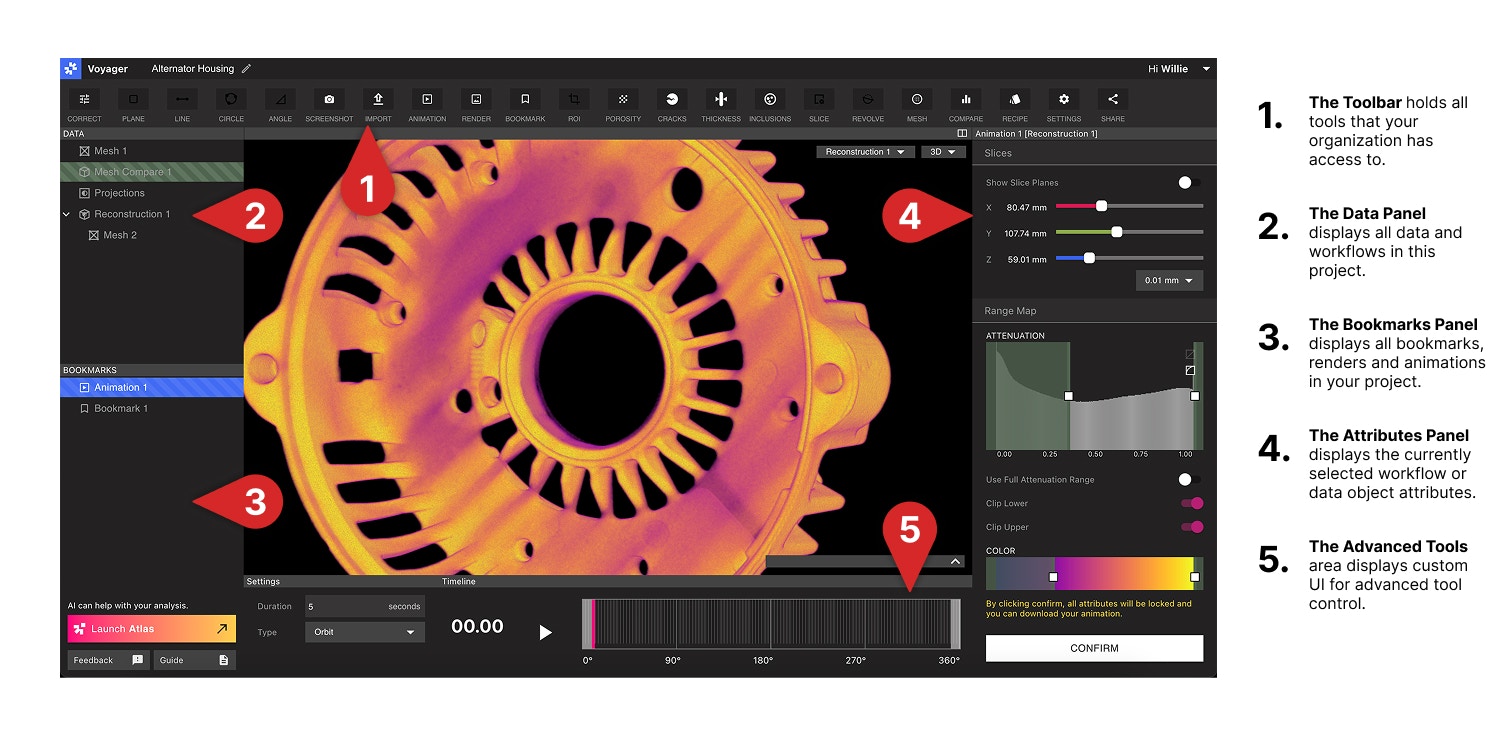
Voyager 模式
從 [Voyager 2.0](/zh-Hant/platform/voyager-release-notes) 起,工具列被組織為三個以任務為核心的[**模式**](/zh-Hant/voyager/voyager-modes)。切換模式會保留您的資料——只有工具集會改變。
[感興趣區域 (ROI)](/zh-Hant/voyager/voyager-region-of-interest)、[檢查平面](/zh-Hant/voyager/voyager-inspection-planes)、[測量工具](/zh-Hant/voyager/voyager-measurement-tools)、[網格](/zh-Hant/voyager/voyager-mesh-tool)、[比較](/zh-Hant/voyager/voyager-cad-comparison) 以及完整的 Integrity Analysis 套件([孔隙率](/zh-Hant/voyager/voyager-porosity-analysis)、[夾雜物](/zh-Hant/voyager/voyager-inclusion-analysis)、[裂紋](/zh-Hant/voyager/voyager-crack-detection)、[壁厚](/zh-Hant/voyager/voyager-wall-thickness-analysis))。
[**3D 自動尺寸標註**](/zh-Hant/voyager/voyager-auto-dimensioning) GD\&T 套件——[直接尺寸](/zh-Hant/voyager/voyager-direct-dimensions)、[平面度](/zh-Hant/voyager/voyager-flatness)、[基準](/zh-Hant/voyager/voyager-datums) 與[輪廓度](/zh-Hant/voyager/voyager-profile)——以自動特徵擷取為基礎建構。
[書籤](/zh-Hant/voyager/voyager-bookmarks)、[算圖](/zh-Hant/voyager/voyager-render-tool) 與[動畫](/zh-Hant/voyager/voyager-animation-tool),用於分享關鍵視圖並將專案轉化為報告。
每個專案都應從[感興趣區域 (ROI)](/zh-Hant/voyager/voyager-region-of-interest) 開始。 ROI 可提升解析度與對比度、將零件對齊至座標系,並且是[尺寸標註模式](/zh-Hant/voyager/voyager-modes#dimensioning-mode)中每個工具的必要前置條件。
分析模式資料
在[分析模式](/zh-Hant/voyager/voyager-modes#analysis-mode)中,專案編輯器將專案資料組織為以下類型,每一類型都會以資料物件呈現:
* **投影** — 掃描期間擷取的原始 X 光照片
* **重建** — 從這些投影所重建的完整 CT 體積
* **感興趣區域 (ROI)** — 重建或另一個 ROI 的定向子體積
* **平面** — 支援 2D 測量的切片視圖
* **網格** — 由[網格工具](/zh-Hant/voyager/voyager-mesh-tool) 產生或透過[匯入工具](/zh-Hant/voyager/voyager-import) 匯入的表面表示
* **分析結果** — 工作流程的輸出(例如 CAD 比較、孔隙率、夾雜物、裂紋與壁厚)
尺寸標註模式資料
在[尺寸標註模式](/zh-Hant/voyager/voyager-modes#dimensioning-mode)中,[3D 自動尺寸標註](/zh-Hant/voyager/voyager-auto-dimensioning) 套件會在定向 ROI 上產生一組以 GD\&T 為核心的平行資料物件:
* **擷取特徵** — 由[自動特徵擷取](/zh-Hant/voyager/voyager-auto-dimensioning#automatic-feature-extraction) 所產生的平面與圓柱;是此模式中每個工具的輸入
* **全零件網格** — 由[輪廓度](/zh-Hant/voyager/voyager-profile) 使用的次體素 (sub-voxel) 邊界網格
* **匯入的 CAD** — 透過[匯入工具](/zh-Hant/voyager/voyager-import) 載入用於輪廓度評估的 `.STEP` 標稱幾何;請參閱[標稱 CAD 匯入](/zh-Hant/voyager/voyager-nominal-import)
* **基準** — 在擷取特徵(或匯入的 CAD)上建構的 Plane、Axis 與 Midplane 參考
* **基準參考框架 (DRF)** — 跨越零件與匯入 CAD 的相關聯基準集合
* **直接尺寸** — [距離、角度與直徑](/zh-Hant/voyager/voyager-direct-dimensions) 量測,支援公差與通過/失敗顏色編碼
* **GD\&T 評估** — [平面度](/zh-Hant/voyager/voyager-flatness) 與[輪廓度](/zh-Hant/voyager/voyager-profile) 結果,以偏差熱圖搭配配合公差的標籤呈現
使用標準滑鼠手勢旋轉、平移和縮放 3D 物件;使用 Viewport 下方的滑桿來瀏覽 2D 平面。所有模式中的導覽方式都相同。
兩組功能與三個模式並列:
* [**程序(automation)**](/zh-Hant/recipes/recipes-intro) — 為您組織自訂的自動化、可重複的掃描與分析步驟序列。
* [**實驗室**](/zh-Hant/voyager/voyager-labs) — 實驗性應用程式,包括[Data Quality Toolkit](/zh-Hant/voyager/voyager-labs-data-quality-toolkit)、[ROI Copy & Paste](/zh-Hant/voyager/voyager-labs-copy-paste) 與[2D 尺寸標註](/zh-Hant/voyager/voyager-labs-2d-dimensioning)。
請聯絡您的客戶成功經理或寄信至 [customersuccess@lumafield.com](mailto:customersuccess@lumafield.com) 以進一步了解進階工具。
***
Voyager 儀表板
Voyager 儀表板是 Voyager 的組織與管理階層。
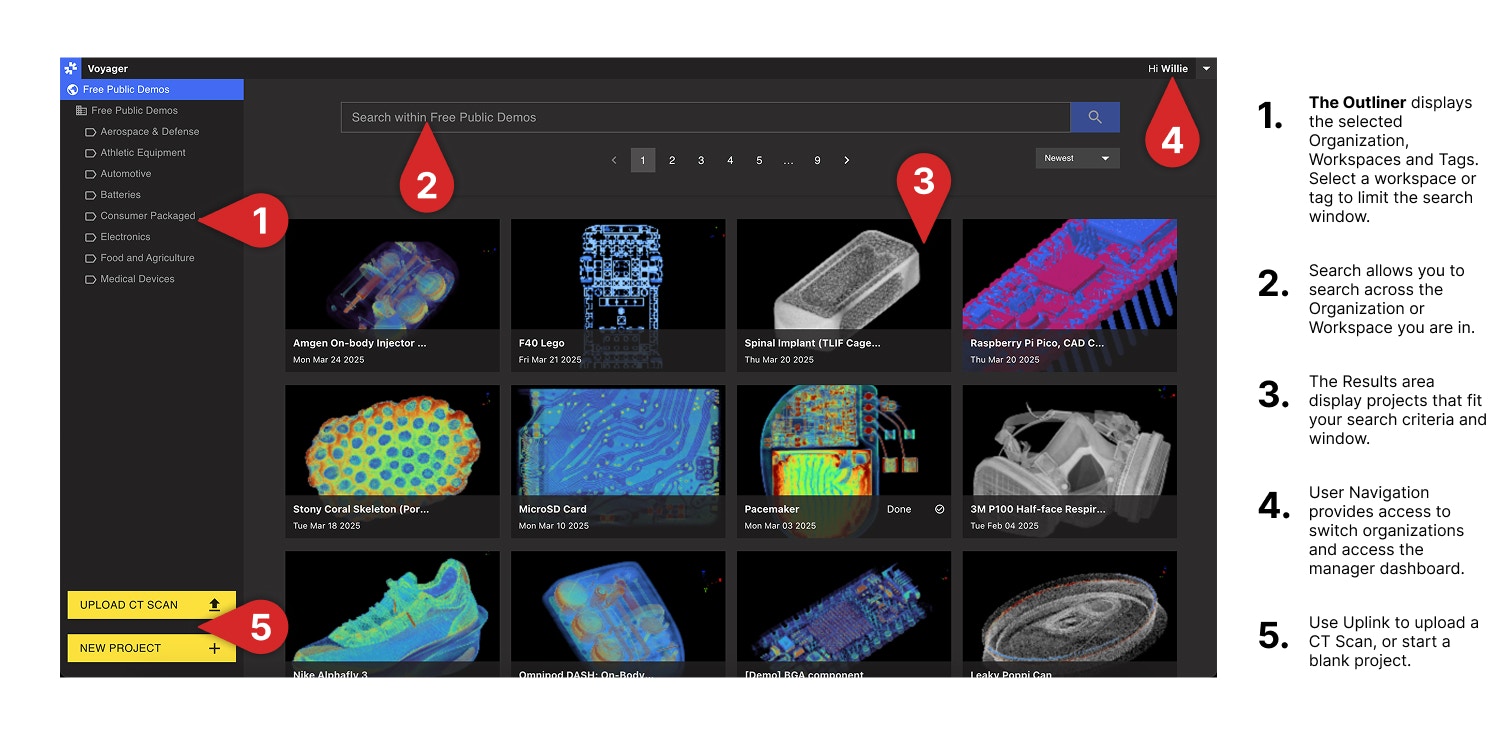 * [**專案儀表板**](/zh-Hant/voyager/voyager-dashboard) 是所有 CT 專案的中心位置,自動填入已完成的掃描。使用 **標籤** 與 [批次操作](/zh-Hant/voyager/voyager-dashboard) 大規模組織與搜尋,並查看您組織的 **工作區**——將相關專案分組的存取邊界。
* [**經理儀表板**](/zh-Hant/voyager/voyager-manager-dashboard) 提供使用者管理、工作區建立、掃描器存取以及組織範圍設定的控制項。存取權限僅限於組織經理。
# Voyager 配置
Voyager 提供 **Cloud**、**GovCloud** 與 **On-Prem** 三種部署形態。
* **Voyager Cloud** 是 Lumafield 的標準託管部署,對受支援的硬體系統提供由 Lumafield 管理的[軟體版本](/zh-Hant/platform/voyager-release-notes)。
* **Voyager GovCloud** 為具有更高安全性和合規性要求的客戶提供類似的部署模式。
* **Voyager On-Prem** 安裝於您的環境中,軟體版本透過 Lumafield 協調發布。伺服器重新啟動說明請參閱我們的 [On-Prem Power](https://support.lumafield.com/neptune/voyager-on-prem-power) 指南。
* [**專案儀表板**](/zh-Hant/voyager/voyager-dashboard) 是所有 CT 專案的中心位置,自動填入已完成的掃描。使用 **標籤** 與 [批次操作](/zh-Hant/voyager/voyager-dashboard) 大規模組織與搜尋,並查看您組織的 **工作區**——將相關專案分組的存取邊界。
* [**經理儀表板**](/zh-Hant/voyager/voyager-manager-dashboard) 提供使用者管理、工作區建立、掃描器存取以及組織範圍設定的控制項。存取權限僅限於組織經理。
# Voyager 配置
Voyager 提供 **Cloud**、**GovCloud** 與 **On-Prem** 三種部署形態。
* **Voyager Cloud** 是 Lumafield 的標準託管部署,對受支援的硬體系統提供由 Lumafield 管理的[軟體版本](/zh-Hant/platform/voyager-release-notes)。
* **Voyager GovCloud** 為具有更高安全性和合規性要求的客戶提供類似的部署模式。
* **Voyager On-Prem** 安裝於您的環境中,軟體版本透過 Lumafield 協調發布。伺服器重新啟動說明請參閱我們的 [On-Prem Power](https://support.lumafield.com/neptune/voyager-on-prem-power) 指南。